
customChat: Difference between revisions
m (template:command argument fix) |
Killzone Kid (talk | contribs) No edit summary |
||
| (40 intermediate revisions by 4 users not shown) | |||
| Line 1: | Line 1: | ||
{{ | {{RV|type=command | ||
| arma3 |= | |game1= arma3 | ||
|version1= 0.50 | |||
| | |gr1= Radio and Chat | ||
| | |gr2= Custom Radio and Chat | ||
| | |arg= global | ||
| | |eff= local | ||
| | |descr= Sends the chat message to the custom radio channel. The radio channel needs to be created on the server before hand, with [[radioChannelCreate]] command. Use [[clearRadio]] to clear chat history | ||
| | {{Feature|important|The unit must have an [[assignItem|assigned]] radio item (such as '''''"ItemRadio"''''') to see or transmit the messages. A radio item must have the property <syntaxhighlight lang="cpp" inline>simulation = "ItemRadio";</syntaxhighlight> in its [[CfgWeapons_Config_Reference#simulation.3D.22Weapon.22|CfgWeapons config]].}} | ||
| | |s1= unit [[customChat]] [customChannelID, message] | ||
| | |p1= unit: [[Object]] - sender | ||
| | |p2= customChannelID: [[Number]] - [[Channel IDs|Custom channel ID]] returned by [[radioChannelCreate]] command | ||
| [[ | |p3= message: [[String]] | ||
|r1= [[Nothing]] | |||
|x1= < | |x1= <sqf>_unit customChat [1, "Hi, I am a custom chat message"];</sqf> | ||
|x2= | |x2= [[File:xChat.jpg|right]] | ||
<sqf> | |||
driver vehicle player sideChat "sideChat"; | |||
driver vehicle player globalChat "globalChat"; | |||
driver vehicle player groupChat "groupChat"; | |||
vehicle player vehicleChat "vehicleChat"; | |||
driver vehicle player commandChat "commandChat"; | |||
driver vehicle player customChat [1, "customChat"]; | |||
systemChat "systemChat"; | |||
</sqf> | |||
|seealso= [[globalChat]] [[groupChat]] [[vehicleChat]] [[commandChat]] [[sideChat]] [[systemChat]] [[radioChannelCreate]] [[customRadio]] | |||
| [[globalChat]] | |||
}} | }} | ||
Latest revision as of 01:04, 17 November 2025

Description
- Description:
- Sends the chat message to the custom radio channel. The radio channel needs to be created on the server before hand, with radioChannelCreate command. Use clearRadio to clear chat history
- Groups:
- Radio and ChatCustom Radio and Chat
Syntax
- Syntax:
- unit customChat [customChannelID, message]
- Parameters:
- unit: Object - sender
- customChannelID: Number - Custom channel ID returned by radioChannelCreate command
- message: String
- Return Value:
- Nothing
Examples
- Example 1:
- _unit customChat [1, "Hi, I am a custom chat message"];
- Example 2:
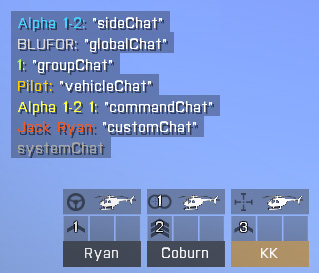 driver vehicle player sideChat "sideChat"; driver vehicle player globalChat "globalChat"; driver vehicle player groupChat "groupChat"; vehicle player vehicleChat "vehicleChat"; driver vehicle player commandChat "commandChat"; driver vehicle player customChat [1, "customChat"]; systemChat "systemChat";

Additional Information
- See also:
- globalChat groupChat vehicleChat commandChat sideChat systemChat radioChannelCreate customRadio
Notes
-
Report bugs on the Feedback Tracker and/or discuss them on the Arma Discord.
Only post proven facts here! Add Note