
sideChat: Difference between revisions
mNo edit summary |
Killzone Kid (talk | contribs) No edit summary |
||
| (91 intermediate revisions by 13 users not shown) | |||
| Line 1: | Line 1: | ||
{{RV|type=command | |||
|game1= ofp | |||
|version1= 1.34 | |||
|game2= ofpe | |||
|version2= 1.00 | |||
|game3= arma1 | |||
|version3= 1.00 | |||
|game4= arma2 | |||
|version4= 1.00 | |||
|game5= arma2oa | |||
|version5= 1.50 | |||
|game6= tkoh | |||
|version6= 1.00 | |||
|game7= arma3 | |||
|version7= 0.50 | |||
|arg= global | |||
|eff= local | |||
|gr1= Radio and Chat | |||
|descr= Types text to the side radio channel by the specified unit. Use [[clearRadio]] to clear chat history | |||
{{Feature|important|The unit must have an [[assignItem|assigned]] radio item (such as '''''"ItemRadio"''''') to see or transmit the messages. A radio item must have the property <syntaxhighlight lang="cpp" inline">simulation = "ItemRadio";</syntaxhighlight> in its [[CfgWeapons_Config_Reference#simulation.3D.22Weapon.22|CfgWeapons config]].}} | |||
|s1= unit [[sideChat]] chatText | |||
|p1= unit: [[Object]] - unit transmitting message | |||
|p2= chatText: [[String]] - message to transmit | |||
|r1= [[Nothing]] | |||
|s2= [side, identity] [[sideChat]] chatText | |||
|p21= side: [[Side]] - side to which the message will be seen | |||
|p22= identity: [[String]] - class name of one of the identities in CfgHQIdentities. Possible identities in {{arma3}} are: | |||
{{Columns|4| | |||
* "Base" | |||
* "HQ" | |||
* "PAPA_BEAR" | |||
* "AirBase" | |||
* "BLU" | |||
* "OPF" | |||
* "IND" | |||
* "IND_G" | |||
}} | |||
|p24= chatText: [[String]] - message to transmit | |||
|r2= [[Nothing]] | |||
|x1= <sqf>_soldierOne sideChat "Show this text";</sqf> | |||
|x2= <sqf>[west, "HQ"] sideChat "Hi there";</sqf> | |||
|x3= [[File:xChat.jpg|right]] | |||
<sqf> | |||
driver vehicle player sideChat "sideChat"; | |||
driver vehicle player globalChat "globalChat"; | |||
driver vehicle player groupChat "groupChat"; | |||
vehicle player vehicleChat "vehicleChat"; | |||
driver vehicle player commandChat "commandChat"; | |||
driver vehicle player customChat [1, "customChat"]; | |||
systemChat "systemChat"; | |||
</sqf> | |||
|x4= <sqf>[[blufor, "BLU"], "message"] remoteExec ["sideChat"]; // shows the message to all players</sqf> | |||
|x5= <sqf> | |||
unit setGroupId ["Cpt. Miller"]; // changes the group's callsign | |||
unit sideChat "Hello ladies!"; | |||
</sqf> | |||
|seealso= [[globalChat]] [[groupChat]] [[vehicleChat]] [[commandChat]] [[customChat]] [[systemChat]] [[sideRadio]] | |||
}} | |||
{{Note | |||
|user= Ceeeb | |||
|timestamp= 20070212043100 | |||
|text= In '''{{ofp}} v1.96''', [[sideChat]] messages can be sent from two abstract sources: "Papa_Bear" and "Base FireFly".<br> | |||
Use [[sideChat]] on an array in the form [SIDE, "base"], [SIDE, "HQ"], [SIDE, "Papa_bear"] or [SIDE, "airbase"], where SIDE is the [[side]] broadcasting. "HQ", "base" and "Papa_bear" seem to be the same object. The callsign strings can be re-defined using a stringTable.csv file, using {{hl|STR_CFG_PAPABEAR}} and {{hl|STR_CFG_FIREFLYBASE}}. | |||
Example : | |||
<sqf>[east, "base"] sideChat "Return to base!"</sqf> | |||
|game= ofp | |||
|version= 1.96 | |||
}} | |||
Latest revision as of 01:06, 17 November 2025


Description
- Description:
- Types text to the side radio channel by the specified unit. Use clearRadio to clear chat history
- Groups:
- Radio and Chat
Syntax
- Syntax:
- unit sideChat chatText
- Parameters:
- unit: Object - unit transmitting message
- chatText: String - message to transmit
- Return Value:
- Nothing
Alternative Syntax
- Syntax:
- [side, identity] sideChat chatText
- Parameters:
- side: Side - side to which the message will be seen
- identity: String - class name of one of the identities in CfgHQIdentities. Possible identities in Arma 3 are:
- "Base"
- "HQ"
- "PAPA_BEAR"
- "AirBase"
- "BLU"
- "OPF"
- "IND"
- "IND_G"
- chatText: String - message to transmit
- Return Value:
- Nothing
Examples
- Example 1:
- _soldierOne sideChat "Show this text";
- Example 2:
- Example 3:
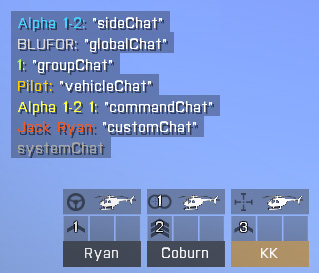 driver vehicle player sideChat "sideChat"; driver vehicle player globalChat "globalChat"; driver vehicle player groupChat "groupChat"; vehicle player vehicleChat "vehicleChat"; driver vehicle player commandChat "commandChat"; driver vehicle player customChat [1, "customChat"]; systemChat "systemChat";
- Example 4:
- Example 5:

Additional Information
Notes
-
Report bugs on the Feedback Tracker and/or discuss them on the Arma Discord.
Only post proven facts here! Add Note
- Posted on Feb 12, 2007 - 04:31 (UTC)
-
In Operation Flashpoint v1.96, sideChat messages can be sent from two abstract sources: "Papa_Bear" and "Base FireFly".
Use sideChat on an array in the form [SIDE, "base"], [SIDE, "HQ"], [SIDE, "Papa_bear"] or [SIDE, "airbase"], where SIDE is the side broadcasting. "HQ", "base" and "Papa_bear" seem to be the same object. The callsign strings can be re-defined using a stringTable.csv file, using STR_CFG_PAPABEAR and STR_CFG_FIREFLYBASE.Example :
Categories:
- Scripting Commands
- Introduced with Operation Flashpoint version 1.34
- Operation Flashpoint: New Scripting Commands
- Operation Flashpoint: Scripting Commands
- Operation Flashpoint: Elite: Scripting Commands
- ArmA: Armed Assault: Scripting Commands
- Arma 2: Scripting Commands
- Arma 2: Operation Arrowhead: Scripting Commands
- Take On Helicopters: Scripting Commands
- Arma 3: Scripting Commands
- Command Group: Radio and Chat
- Scripting Commands: Local Effect